번들 작성 도구
번들 작성 도구는 입력으로 번들 스펙 파일을 사용하는 Zip으로 압축된 번들 파일들을 생성하기 위해 사용된다. 번들이 수동으로 생성되어질 경우, 잘 정의된 디렉토리 계층구조와 옵션으로 WinZip과 같은 유틸리티로 Zip 파일로 압축하고, 완전 자동화된 방법으로 번들 파일을 만드는 것은 에러가 발생하기 쉽다(?)
번들 스펙 파일
무슨 일이 발생하는지 알기 위해서, 번들 작성 도구는 입력으로 번들 스펙 파일이 필요하다. 번들 스펙 파일은 (반드시 그래야 하는건 아니지만) 대게 .bndlspec 확장자를 갖는다.
번들 스펙 파일은 번들의 매니페스트(번들의 일부분이 되는 모든 공유 라이브러리의 리스트와 번들의 일부분이 되는 모든 리소스와 데이터 파일들의 리스트)를 생성하기 위해서 필요한 정보를 포함한다. 간단한 XML 파일 포맷이 사용된다.
다음은 번들 스펙 파일의 예제이다:
<bundlespec>
    <manifest>
        <name>Greeter Sample</name>
        <symbolicName>com.appinf.osp.samples.greeter</symbolicName>
        <version>1.0.0</version>
        <vendor>Applied Informatics</vendor>
        <copyright>(c) 2007, Applied Informatics Software Engineering GmbH</copyright>
        <activator>
            <class>GreeterBundleActivator</class>
            <library>Greeter</library>
        </activator>
        <lazyStart>false</lazyStart>
        <runLevel>400</runLevel>
        <dependency>
            <symbolicName>com.appinf.osp.samples.greetingservice</symbolicName>
            <version>1.0.0</version>
        </dependency>
    </manifest>
    <code>
        bin/*.dll,
        bin/*.pdb,
        bin/${osName}/${osArch}/*.so,
        bin/${osName}/${osArch}/*.dylib
    </code>
    <files>
    </files>
</bundlespec>
번들 스펙 요소
The bundlespec Element
Thebundlespecelement is the XML root element in a bundle specification. It is mandatory.
The manifest Element
Themanifestelement is used to specify the bundle's manifest data. It is mandatory.
The name Element
Thenameelement specifies the bundle's user-readable name. It is mandatory. Instead of a fixed name, thenameelement can contain a reference to a bundle property (e.g.,${bundleName}). This property must be defined in the bundle'sbundle.propertiesfile.
The symbolicName Element
ThesymbolicNameelement specifies the bundle's symbolic name. Is is mandatory.
The version Element
Theversionelement specifies the bundle's version. Is is mandatory.
The vendor Element
Thevendorelement specifies the name of the organization providing the bundle. It is optional. Instead of a fixed name, thevendorelement can contain a reference to a bundle property (e.g.,${vendorName}). This property must be defined in the bundle'sbundle.propertiesfile.
The copyright Element
Thecopyrightelement specifies the bundle's copyright information. It is optional. Instead of a fixed string, thecopyrightelement can contain a reference to a bundle property (e.g.,${copyrightInfo}). This property must be defined in the bundle'sbundle.propertiesfile.
The activator Element
Theactivatorelement specifies the name of the class implementing the bundle's activator in theclasssub element, and optionally the name of the shared library containing the bundle activator in thelibrarysubelement. The extension of the shared library (e.g.,.dllor.somust be omitted from the library name. The element is optional.
The lazyStart Element
ThelazyStartelement specifies whetherlazy startshould be enabled for the bundle. It is optional. Valid values aretrueorfalse.
The runLevel Element
TherunLevelelement specifies the bundle's run level. It is optional.
The dependency Element
Thedependencyelement specifies the bundles that this bundle requires to function. The symbolic name of a required bundle is specified in thesymbolicNamesub element. The required version of the bundle is specified in theversionsub element.
Thedependencyelement can occur zero or more times.
The extends Element
The optionalextendselement makes the bundle an extension bundle and specifies the bundle that this bundle extends. The symbolic name of the extended bundle must be specified in the element.
Theextendselement can occur at most once.
The code Element
Thecodeelement contains a comma-separated list of shared libraries that must be part of the bundle. Glob expressions (seePoco::Glob) can be used. Also, the propertiesosNameandosArchcan be used.
Shared libraries that cannot be found are ignored. This allows you to use the same bundle specification on different platforms.
This element is optional.
The files Element
Thefileselement contains a comma-separated list of files that must be part of the bundle. Glob expressions (seePoco::Glob) can be used. Directories are copied recursively.
This element is optional.
번들 작성 도구 호출하기
번들 작성 도구는 인자로 번들 스펙 파일의 파일명을 취한다. 부가적으로, /output (윈도우즈) 또는 --output /-o (유닉스) 옵션은 번들 파일이 생성될 디렉토리를 명시하기 위해서 사용될 수 있다. 더 많은 정보는 /help 또는 --help 옵션으로 bundle 명령어를 실행하면 된다.
비쥬얼 스튜디오로부터 번들 작성 도구 호출하기
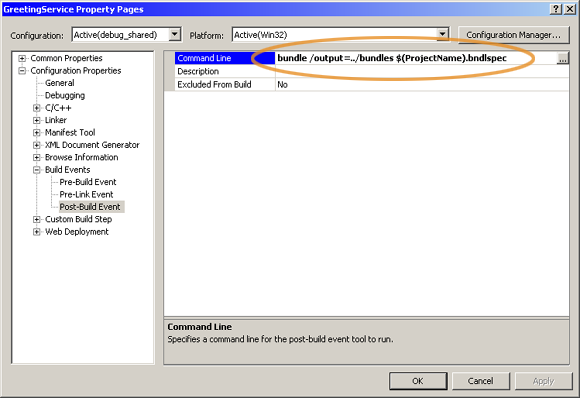
번들의 빌드 과정의 일부로 비쥬얼 스튜디오로부터 직접 번들 생성 도구를 호출하기 위해 편리하다. 이것을 수행하기위해, 아래와 같이 프로젝트의 Post-Build Event에 번들 작성 도구를 호출하는 명령어를 추가한다.
Makefile로부터 번들 작성 도구 호출하기
번들 작성 도구는 빌드 과정의 일부로 Makefile 플랫폼으로 부터 호출될 수 있다. 만약 POCO C++ 라이브러리로부터의 GNU Make 기반 빌드 시스템이 사용된다면, 번들 작성 도구 호출은 post-build 단계로 완료할 수 있다. post-build 단계는 다음과 같이 postbuild Make 변수에 명령어를 할당하여 정의될 수 있다.
BUNDLE_TOOL = $(POCO_BASE)/OSP/BundleCreator/$(BINDIR)/bundle

include $(POCO_BASE)/build/rules/global

objects = Greeter

target         = com.appinf.osp.samples.greeter
target_version = 1
target_libs    = PocoOSP PocoUtil PocoXML PocoFoundation

postbuild      = $(BUNDLE_TOOL) -o../bundles Greeter.bndlspec

include $(POCO_BASE)/build/rules/dylib
임베디드 리눅스를 위한 번들과 크로스 컴파일
.